Omada
- 4.4
- Rating
- 500.00K
- Installs
- Free
- Price

 Analysis by App-foxy
I approached Omada as a health companion rather than a general fitness tracker. Developed by Omada Health, this free medical app is designed to support people already taking part in an Omada program, helping them stay connected with that experience from a phone. That distinction matters: it is not the kind of app I would open simply to browse workouts or count every detail of a casual walk. Its value comes from fitting into a broader health-management routine.
After spending time with it, my main impression is that the app works best when I treat it as the place where a health plan becomes part of my day. It gives the program a more immediate, less paper-based feel, while keeping the focus on engagement rather than entertainment. I would recommend it to someone who has access to the Omada program and wants a convenient way to keep up with that process. I would be much less likely to suggest it as a standalone replacement for a doctor, a full medical record, or a highly customizable exercise platform.
From a health goal to a daily routine
The starting condition for using Omada is usually a practical one: I have a health goal, I am enrolled in a supported program, and I need help turning good intentions into repeatable actions. That is where the app makes sense. Instead of relying only on appointments, printed guidance, or memory, I can use the phone as a regular point of contact with the program.
You May Also Like

 Blood Strike: 2.5 Anniversary
Blood Strike’s Loadouts Turn Every Drop Into a Tactical Gamble
A close look at Blood Strike’s custom loadouts: how fast access to signature weapons reshapes its battle royale rhythm, rewards preparation, and narrows the gap between fights.

 Pandora - Music & Podcasts
Pandora’s Music Is Easy to Start, but Harder to Recover
Pandora’s strength is its low-effort path from a seed to a station. Its weak spot is how much confidence it asks you to place in connection, setup, and quiet recovery.

 8 Ball Pool
 Is Built on Rivalries, Rematches, and Routine
A close look at the rivalries, rematches, shared routines, and unanswered safety questions that turn a quick pool match into a persistent mobile community.

 Samsung Music
’s Quiet Strength Is Playing What You Already Own
Its reach comes less from spectacle than from dependable access to a personal library. That simplicity is both the app’s strongest retention engine and its ceiling.

 AccuWeather: Weather Radar
AccuWeather Review: A Quick, Clear Forecast for Everyday Decisions
For everyday plans, the best forecast is the one you can understand quickly. AccuWeather makes rain timing, radar, and local conditions easy to act on, with a few trade-offs.

 Hill Climb Racing
Why Hill Climb Racing Still Turns Crashes Into One More Run
A tiny car, a bumpy hill and one more upgrade: Hill Climb Racing keeps resurfacing because its simple chaos makes every near-miss feel personal.
More From Our News Desk



The first thing I look for in an app like this is whether it reduces the distance between deciding to act and actually recording or reviewing what happened. Omada is built around that connection. The store summary describes it as a way to enhance the program experience and help users stay engaged, and that is a more accurate expectation than imagining a complete hospital-style dashboard. Its role is supportive and practical.
The app is free to install, carries an Everyone content rating, and has been available since November 2014. It has grown into a familiar option in its niche, with an average rating of 4.4 from around twenty-six thousand ratings and more than five hundred thousand installs. Those figures suggest that it has reached a substantial audience, but they should not be read as proof that it will suit every medical situation. A health app can be well received and still be the wrong tool for someone who needs a different kind of care.
On Android, the current version is 26.3.0 and it requires Android 8.0 or later. That makes checking the phone’s operating system an easy first step before planning around it. I also think it is useful to separate two questions: can the app run on the device, and does the user actually have access to the program it supports? The first is a technical requirement; the second is the more important practical one.
The first setup should be treated as part of the plan
When I begin with a health app, I do not rush through the opening screens just to reach the main interface. I want to understand what the app expects me to do, what information belongs in the program, and how often I am supposed to return. With Omada, that mindset is especially helpful because the app is not just a blank notebook. It is an extension of a structured health experience.
A useful approach is to decide in advance when the app will fit into the day. I might check it after breakfast, use it when I finish a planned activity, or review it before bed. The specific time is less important than choosing a reliable cue. Without that cue, even a well-designed companion app can become something I open only when I remember, which defeats the purpose of ongoing engagement.
This is one of the less obvious trade-offs. The app can make a program easier to reach, but it cannot create consistency by itself. If I install it without changing my routine, the phone becomes another place where unfinished intentions collect. The strongest results come when I use it as a checkpoint attached to an existing habit rather than expecting notifications or a polished interface to do all the motivational work.
Following the workflow instead of treating it like a tracker
Once the starting point is clear, the day-to-day flow becomes easier to understand. I use the app as a bridge between what I am doing in real life and the health program that helps me interpret that effort. The important sequence is not simply opening the app, tapping a button, and closing it. It is noticing a goal, taking an action, bringing that action back into the program, and then using the resulting guidance to decide what comes next.
That makes Omada different from a typical activity tracker. A tracker often centers on numbers, charts, streaks, or competition. Those tools can be useful, but they may encourage me to chase a target without thinking about whether the target fits my broader health plan. Omada’s appeal is more program-oriented. I am not using it only to admire a graph; I am using it to stay involved with a guided process.
For example, imagine I have a busy weekday and want to avoid losing contact with my plan. I can make a short check-in part of my lunch break, review the action I am working on, and return later to reflect on how the day went. The benefit is not that the phone magically improves my choices. The benefit is that the program remains visible at the moment when a small decision is still possible.
I would not describe this as a replacement for clinical judgment. If I have symptoms, medication concerns, or a sudden change in my condition, an app should not become my only source of advice. Omada is more useful for supporting an established plan than for deciding what a new or urgent medical problem means.
Where handoffs matter
The most important part of this experience is the handoff between the individual and the wider program. I may begin with something personal, such as a meal choice, a planned activity, or a decision to review my progress. The app then helps connect that moment to the program’s ongoing structure. The quality of that handoff determines whether the app feels useful or merely administrative.
I find that the best way to use it is to avoid treating each interaction as isolated. If I record or review something, I should also ask what it changes about my next decision. That may mean adjusting the time of a check-in, preparing for a difficult part of the day, or returning to the program’s guidance before a familiar obstacle appears. The app becomes more valuable when each visit has a purpose.
There is also a handoff between the app and the human support surrounding the program. Digital tools are good at making information available at the right moment, but they are not automatically good at understanding context. If a routine has become unrealistic because of work, travel, illness, or family responsibilities, I should not quietly blame myself for failing to follow it. That is the point at which a conversation with the appropriate care or program support matters more than another tap on the screen.
This is a genuine strength and a limitation at the same time. Omada can keep me engaged between larger points of contact, but the app’s usefulness depends on the surrounding program being relevant to me. Someone looking for a completely independent health journal may find the experience too tied to that ecosystem. Someone already participating in Omada is more likely to see the connection as an advantage.
A realistic everyday scenario
Consider a person who works from home and tends to lose track of health goals during a crowded afternoon. In the morning, the plan is clear, but meetings, snacks, and unfinished tasks gradually push it aside. A practical workflow would be to use Omada at a planned point before the afternoon becomes chaotic, review the current focus, and make one manageable decision rather than trying to repair the entire day at night.
Later, the person can return to the app and use the program experience to keep the action connected to the larger goal. The useful outcome is not a perfect day. It is a visible chain from intention to action to reflection. That chain is easier to maintain when the app is already part of the routine and when the user is honest about what made the plan difficult.
My tip here is to use the app before the predictable problem, not only after it. If evenings are difficult, a midday check-in may be more valuable than a late-night review. If mornings are rushed, a short session after the first stable part of the day may work better. This is a small workflow adjustment, but it addresses a weakness common to health apps: people often open them after the opportunity to make a useful choice has passed.
What the result feels like
The result I expect from Omada is improved continuity. I can stay closer to the program, keep its guidance within reach, and make health-related actions feel less disconnected from the rest of my day. That is a modest promise, but it is a meaningful one for someone who benefits from regular structure.
I would not judge the app by whether it gives me a dramatic transformation after a few sessions. A better test is whether it helps me return to the plan after an imperfect day. Health routines are rarely linear, and an app that makes restarting feel manageable can be more useful than one that mainly celebrates flawless streaks.
Another practical result is reduced mental load. I do not have to keep every part of the program in my head at once. The app gives me a place to reconnect with the experience when I need it. That can be especially helpful for users who are motivated but forgetful, or who understand what they should do yet struggle to keep the plan visible during ordinary life.
Still, I would keep expectations realistic. Omada is not a universal medical solution, and the app alone cannot guarantee progress. It supports engagement; it does not remove the need for personal judgment, professional care, or changes to a routine that is not working. The result depends heavily on whether the program matches the user’s needs and whether the user returns often enough to benefit from the connection.
How it compares with familiar alternatives
Compared with a general wellness app, Omada feels more focused on participation in a specific health program. A broad wellness app may offer a wider selection of workouts, meal tools, reminders, or device integrations, making it better for someone who wants to build a completely custom system. Omada is the more sensible choice when I want the app to reinforce an existing program rather than assemble one from separate pieces.
Compared with a simple notes app or paper journal, it offers a more direct relationship with the Omada experience. A notebook gives me flexibility and privacy in how I write, but it does not provide the same program-centered context. On the other hand, a person who only wants to jot down occasional observations may find a dedicated medical companion more structured than necessary.
Compared with a hospital or clinic portal, Omada appears better suited to ongoing engagement than to being a complete record of every medical interaction. A portal is usually the place I expect to review formal appointments, test information, or administrative details. I would use Omada for the supported health journey and keep those other needs in the appropriate clinical system.
This comparison leads to a simple decision rule. Choose Omada when the program connection is the reason you need an app. Choose a general tracker when customization and broad activity monitoring matter more. Choose a clinical portal when formal medical information and communication are the priority. The wrong choice is not necessarily a bad app; it is often an app being asked to solve a different problem.
Where the flow breaks down
The first point of friction is dependence on context. If I am not part of the relevant Omada experience, the app may not offer enough value to justify becoming another daily destination. Its purpose is clearer for participants than for casual downloaders. That is important because the word “medical” can make people expect a broad diagnostic or treatment tool, while the practical experience is more focused on supporting engagement.
The second issue is that engagement can become a chore if I approach every interaction as an obligation. A health app can encourage accountability, but accountability feels different from pressure. If the workflow becomes a series of boxes to tick without helping me understand my next step, I am likely to disengage. The solution is to connect each visit to a real decision, not to open the app merely to preserve a streak or satisfy a habit.
There is also a device-related boundary. Android support begins with version 8.0, so users on older phones may need to consider compatibility before relying on it. Even when the app runs, a small screen, an aging device, or an inconsistent routine can make repeated health interactions less comfortable. I would test the basic flow early rather than waiting until the program depends on it.
Privacy and medical responsibility deserve a careful mindset as well. I would read the app’s current permissions and privacy information before entering sensitive details, and I would keep my phone protected with the usual device security measures. More importantly, I would never use the app to delay professional help when something feels urgent. Convenience is valuable, but it should not blur the line between program support and medical care.
Finally, the app may not satisfy users who want deep customization. Someone who enjoys building elaborate dashboards, comparing many data sources, or controlling every category may prefer a specialized tracker. Omada’s strength is the guided connection to its program, and that same focus can feel restrictive to a person who wants an open-ended health laboratory.
Who should use it and who should skip it
I think Omada is a good fit for someone enrolled in an Omada Health program who wants the plan close at hand throughout the day. It is also suitable for people who benefit from gentle structure, regular check-ins, and a clear link between everyday choices and a larger health objective. The free price removes one obvious barrier to trying it, although access to the surrounding program remains the practical question.
I would be cautious about recommending it to someone seeking emergency guidance, diagnosis, a replacement for a clinician, or a fully independent fitness platform. It is also not my first choice for a user who wants only a minimalist log with no program framework. In those cases, a different type of medical or wellness tool may be a better match.
My most useful tip is to decide what “engaged” means before using the app. It could mean reviewing the current plan at a consistent time, reconnecting after a missed day, or using a difficult moment as a prompt to return to the program. Defining that outcome prevents the app from becoming a vague promise and turns it into a specific part of the day.
My recommendation after using the workflow
Omada succeeds when I judge it by continuity rather than spectacle. It brings a supported health program into ordinary moments, helps keep the next action visible, and can make a long-term plan feel less distant. Its strongest use is not collecting impressive numbers or replacing every other health tool. It is maintaining the handoff between what I intend to do, what I actually do, and how I continue with the program afterward.
I would recommend giving it a fair trial if you are already connected to Omada Health and want a phone-based way to stay involved. I would begin with one dependable daily checkpoint, use the app before predictable obstacles, and pay attention to whether it genuinely helps me resume the plan after setbacks. If it does, the simplicity is a benefit. If I need a broader tracker or formal clinical record, I would choose a more suitable companion instead.
Overall, the best reason to choose Omada is its role as a bridge between a structured health program and real daily behavior. It is free, accessible to a wide audience, and established enough to have attracted many users, but its value remains highly situational. For the right participant, it can make engagement easier and more consistent. For everyone else, the most honest conclusion is that a focused program companion should not be mistaken for an all-purpose medical app.
FAQs for Omada
01What is Omada, and how does it work?
Omada is a health and wellness app designed to support users in achieving lifestyle changes through personalized coaching, educational content, and community support. Users begin by completing a health assessment, after which they receive a customized plan tailored to their specific needs and goals. The app tracks progress and provides resources to help users stay motivated.
02Is Omada suitable for everyone, or are there specific criteria to join?
Omada is primarily designed for individuals looking to improve their health through lifestyle changes, such as weight loss or managing chronic conditions like diabetes. While the app is suitable for a wide audience, it is especially beneficial for those who have been recommended by a healthcare provider. Some users may need to meet specific health criteria to join certain programs.
03What features does Omada offer to enhance user experience?
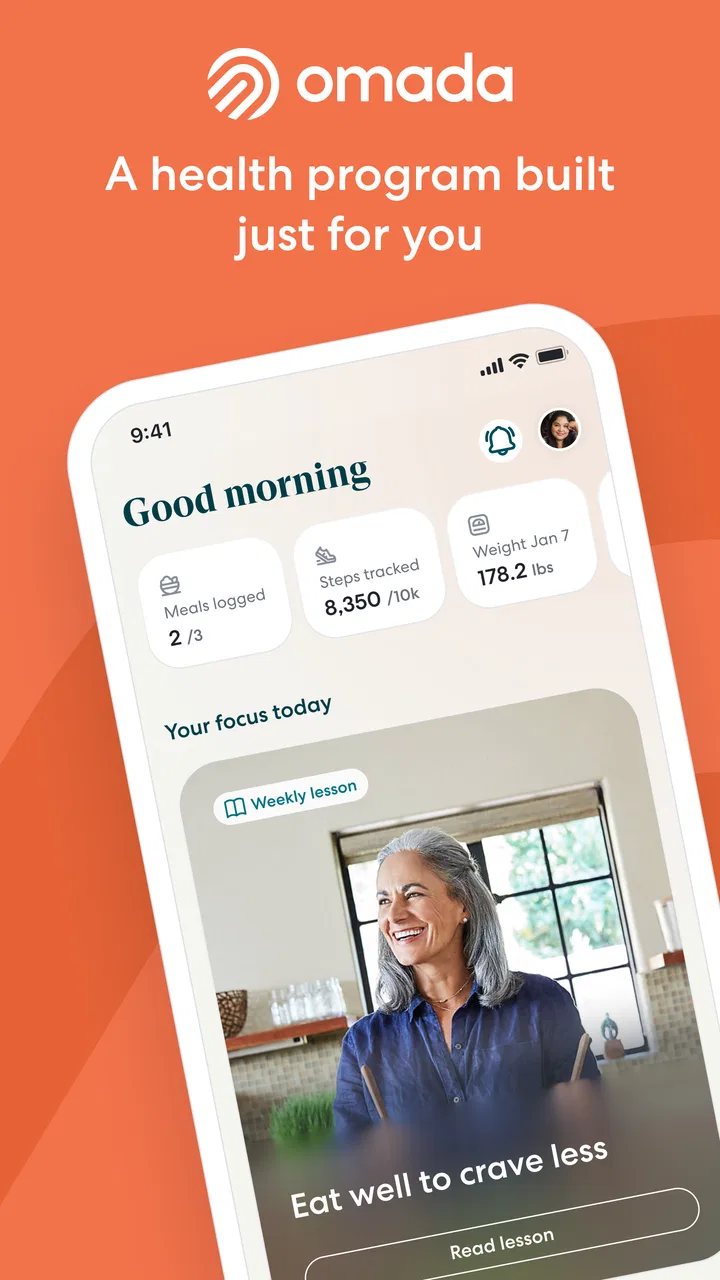
Omada offers a variety of features including personalized coaching, weekly interactive lessons, and a supportive online community. The app also includes tracking tools for diet and physical activity, along with integration capabilities for devices like fitness trackers. These features are designed to keep users engaged and motivated throughout their health journey.
04Are there any costs associated with using Omada?
The cost of using Omada can vary depending on whether it's covered by an employer or healthcare provider. Some users may have access to the app at no cost, while others might need to pay a fee. It's advisable to check with your employer or insurance provider to see if they offer coverage for Omada's programs.
05How does Omada ensure the privacy and security of user data?
Omada takes user privacy and data security seriously, employing industry-standard encryption and security protocols. The app complies with relevant regulations such as HIPAA, ensuring that personal health information is protected. Users can review the app’s privacy policy to understand how their data is collected, used, and stored.
Pros
- User-friendly interface for easy navigation.
- Real-time updates enhance user engagement.
- Wide range of sports and events covered.
- Offers social features like chats and leagues.
- Competitive leaderboard keeps users motivated.
Cons
- Occasional bugs affect app performance.
- Limited customer support options available.
- Some features require in-app purchases.
- Notifications can be overwhelming at times.
- Requires a stable internet connection.

Omada
Gallery